
Omake | Auto Free Gift
Free gifts over ¥10,000,
without touching your theme.
A Shopify app that automatically adds free gifts to the cart when shoppers qualify. Set conditions on cart total, product tags, customer tags, and more, with no theme code changes.
Free plan available. Try paid plans free for 7 days.

Problem
Common problems
with free gifts
Common problem

Staff check every order
to see if it qualifies for a gift…
Common problem

Shoppers forget to add the gift,
leading to inquiries and reshipping…
Common problem

Worried about people ordering
only the free gift…
Omake solves
these problems.
Qualifying carts get the gift automatically, and orders that don't qualify are stopped at checkout. No more manual checks, no more abused gifts.
Features
What Omake can do
-
01
Add gifts automatically when shoppers qualify
Choose when to give a gift based on cart total, item count, product tags, and more.

-
02
Three ways to give gifts
Add gifts automatically, with a checkbox, or in a dialog.

-
03
Show how much more to spend
The cart shows messages like "Spend ¥2,000 more for a free gift" to encourage one more item.

-
04
Block unqualified orders at checkout
Orders that don't meet the conditions are stopped at checkout.

-
05
Pro plan only
Fine-tune with customer tags, collections, and dates
Use customer tags, collections, and schedules as conditions, with up to 5 gift rules.

-
06
No theme code changes
Just turn on the app embed in the theme editor.

-
07
Pro plan only
Offer the gift inside checkout on Shopify Plus
Show the gift on the checkout page. ¥0 gifts are added automatically, and other gifts get an Add button (Shopify Plus stores only).


Demo
Try it in
four demo stores
Try the three ways to add gifts and the gift offer inside Shopify Plus checkout, each in its own store. Add products to the cart and watch the gift being added.

Add automatically
Cosmetics store
When the conditions are met, the gift is added to the cart without any action from the shopper.
- Serum trial sample on orders of ¥5,000 or more
- Mini pouch with 3 or more items
- Cotton pads when a serum is in the cart
Demo store password
Let shoppers choose with a checkbox
Apparel store
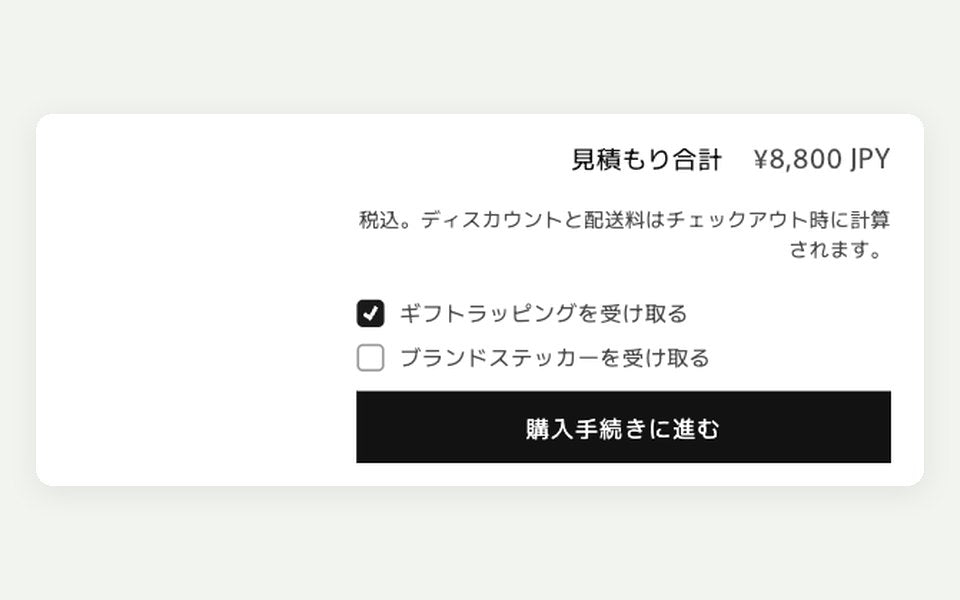
Checkboxes above the checkout button let shoppers pick which gifts to receive.
- Gift wrapping on orders of ¥3,000 or more
- Logo socks on orders of ¥10,000 or more
- Sticker with 2 or more items
Demo store password
Offer in a dialog
Lifestyle goods store
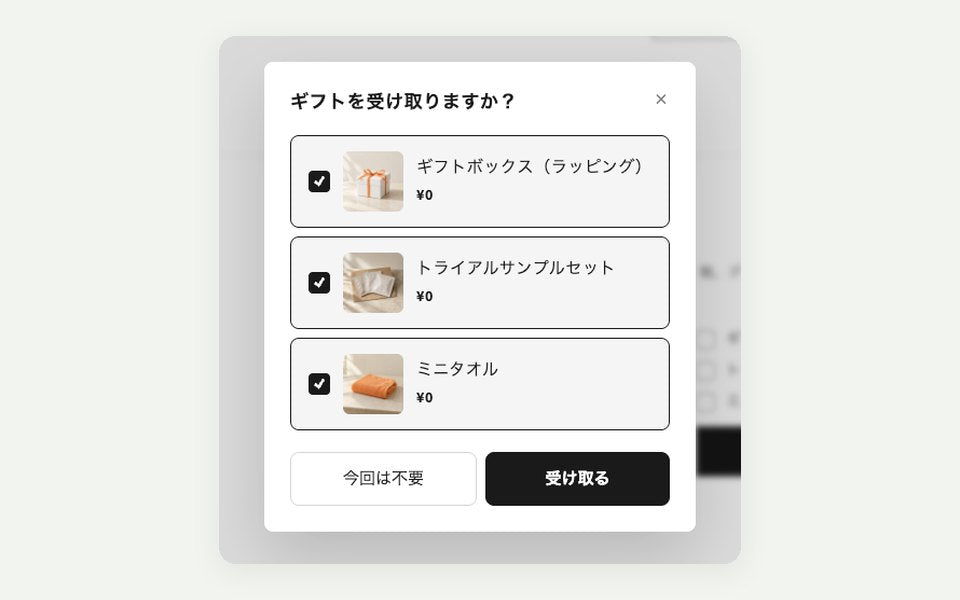
A dialog appears when the conditions are met, and shoppers choose whether to receive each gift.
- Gift box (wrapping) on orders of ¥10,000 or more
- Trial sample set with 2 or more new arrivals
- Mini towel on orders of ¥15,000 or more
Demo store password
Offer inside checkout
Food & drink store
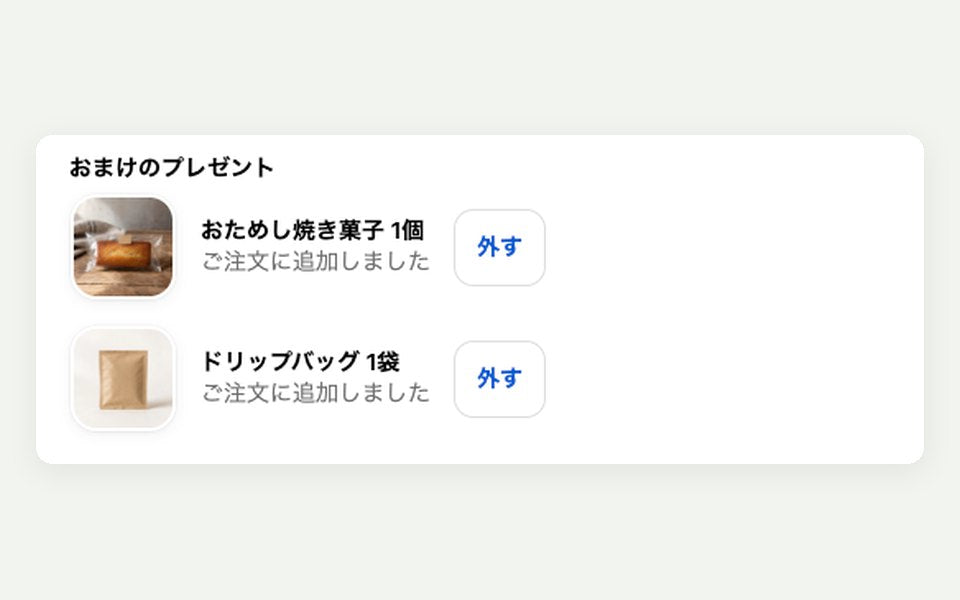
The gift is offered on the checkout page. ¥0 gifts are added automatically.
- Trial baked sweet on orders of ¥3,000 or more
- One drip coffee bag when coffee is in the cart
Demo store password
These are test stores. No products are actually sold.
Flow
Getting started
Install from the App Store
Install from the Shopify App Store and choose a plan. You can start on the Free plan.
Set up a gift and its conditions
Choose a gift product and a condition such as "¥10,000 or more", then save. The setup guide in the app walks you through the rest.
Turn on the app embed
Turn on "Omake gift auto-add" in the theme editor and it goes live in your store.
Pricing
Pricing
Charges are billed through your Shopify invoice.
Free
- Works on Shopify Plus stores too
- 1 gift rule with 1 condition
- Conditions: cart total, item count, product tags
- Add automatically, by checkbox, or in a dialog
- Progress bar banner
- Blocks unqualified orders at checkout
Pro
$39.99/year · 7-day free trial
- Works on Shopify Plus stores too
- Everything in Free
- Up to 5 gift rules with priority
- Combine up to 3 conditions with AND/OR
- Collection, customer tag, and login conditions
- Variant metafield conditions
- Start and end date and time for each gift (applied at those times at checkout too)
- Inventory sync (pause when sold out, alerts)
Business
$99.99/year · 7-day free trial
- Works on Shopify Plus stores too
- Everything in Pro
- Up to 10 gift rules
- Limited quantity with auto-pause
- Analytics by gift rule
- Shopify Flow triggers and actions
- Copy settings to another store
Shopify Plus only
$199.99/year · 7-day free trial
- For Shopify Plus stores that want to offer the gift inside checkout
- Everything in Business
- Gift offer inside checkout
- Works with Buy it now and Shop Pay
Prices are in US dollars and exclude tax. Shopify Plus stores can use the Free, Pro, and Business plans as they are (the gift is offered in the cart). You only need the Shopify Plus only plan to offer the gift inside checkout. On stores that are still being built (development stores and client transfer stores), you can try every plan's features for free while the store is in development.
Start on the Free plan and switch to Pro when you need more.
Install from the App StoreOpens in a new window.Developer
Omake is built by Craftify,
a Shopify specialist agency.
We build and run Shopify stores. We can also adjust your theme for Omake or help with your store as a whole.
FAQ